
Instead of manually matching finance applications to BigCommerce orders, design a workflow that links each checkout to a verified finance outcome before releasing goods. For a BigCommerce buy now pay later integration with PayItMonthly, first confirm the supported connection method; this 2026 guide sets out the order mapping, decision handling and tests your implementation needs.
- A BigCommerce buy now pay later integration needs a confirmed connection method before checkout configuration begins.
- PayItMonthly provides interest-free monthly instalments for UK retailers; verify BigCommerce compatibility directly before implementation.
- Keep application submission, finance approval and fulfilment permission separate in your order workflow.
- Test declined applications, interrupted checkouts and repeated notifications before enabling live customer finance.
Why this matters
A checkout redirect is not proof that finance has been approved. Your store needs a reliable way to connect the customer's application, the provider's decision and the correct order without treating an unfinished application as a completed purchase.
PayItMonthly is best suited to UK retailers seeking interest-free monthly instalments for their customers. Its role as a buy-now-pay-later platform does not, by itself, establish a native BigCommerce connector, specific API behaviour or automatic order updates.
Treat your 2026 implementation as a controlled payment workflow, not simply another checkout label. The key question is whether your store can distinguish a customer starting an application from the provider confirming the conditions required to proceed.
Before you start
- Access and ownership: Have authorised BigCommerce administration access, a technical owner for checkout changes and a contact who can confirm PayItMonthly's supported connection route. Obtain current setup instructions and any required merchant access before changing checkout.
- Implementation materials: Prepare your order-reference format, customer-facing finance wording, fulfilment rules and cancellation process. Request the provider's documentation for decisions, testing, security and reconciliation where those functions are supported.
- The non-obvious gotcha: A customer returning to your store does not prove approval. Establish the authoritative confirmation method and the exact event permitting fulfilment before building a redirect or changing order status.
Do not install an unrelated payment extension or enter credentials into an unverified connector. Confirm who supplies and maintains the connection, which storefront configurations it supports and who handles faults between systems.
Connection route
Choose the route only after the provider confirms what is supported for your store. The comparison below describes implementation patterns, not a claim that either route is supplied for this particular platform pairing.
| Workflow option | Best for | Practical advantage | Limitation to resolve |
|---|---|---|---|
| Checkout connection, if supported | Retailers needing finance within the checkout journey | Can connect the purchase journey and order handling through a supported implementation | Requires confirmed compatibility, documented decision handling and testing |
| Separate application journey, if supported | Retailers assessing an assisted finance process | Separates the application from checkout configuration | Requires explicit order matching and a clear process for unfinished applications |
Configure the supported route
- Ask the provider to confirm the supported BigCommerce implementation in writing. Establish whether it uses a maintained connector, a documented custom connection or a separate application process.
- Obtain the current installation instructions for the confirmed route. Follow their exact interface labels; do not substitute instructions from another commerce platform.
- Confirm which party owns installation, ongoing maintenance, credential changes and fault resolution. Include your developer where the connection requires custom work.
- Identify the test environment or provider-approved testing procedure. Keep development credentials separate from live credentials, and keep secret credentials out of browser-delivered code.
- Record the agreed scope in your 2026 release checklist, including the storefront, currency, products and customer journey covered by the implementation.
Expected result: You have a documented connection route and a named owner for each system. You are not relying on an assumed app, guessed endpoint or unverified setup screen.
If compatibility remains unconfirmed, stop checkout implementation. You can still prepare order rules and customer support procedures, but those preparations are not evidence that the connection is ready to launch.
Order mapping
The order reference is the link between the basket and the finance application. Build that link before designing automatic status changes, then decide what your store should do when the basket changes or the customer leaves.
Define the order reference
- Select a stable merchant-side reference for the purchase attempt. Establish when that reference is created and how your implementation associates it with the finance application.
- Map the required purchase information using the provider's documented format. Check the treatment of delivery, tax, discounts and any excluded items rather than assuming the basket subtotal is sufficient.
- Preserve the relationship between the merchant reference and any provider-issued reference. Store only the information your operations team needs to reconcile the order.
- Define what happens if the customer changes the basket after starting an application. Require a documented amendment or replacement process rather than silently reusing a decision for a changed purchase.
- Assign ownership of unmatched records. Give support staff a way to find the merchant reference without asking customers to send sensitive financial information.
Expected result: Your team can identify which purchase each application concerns and explain how an altered basket is handled.
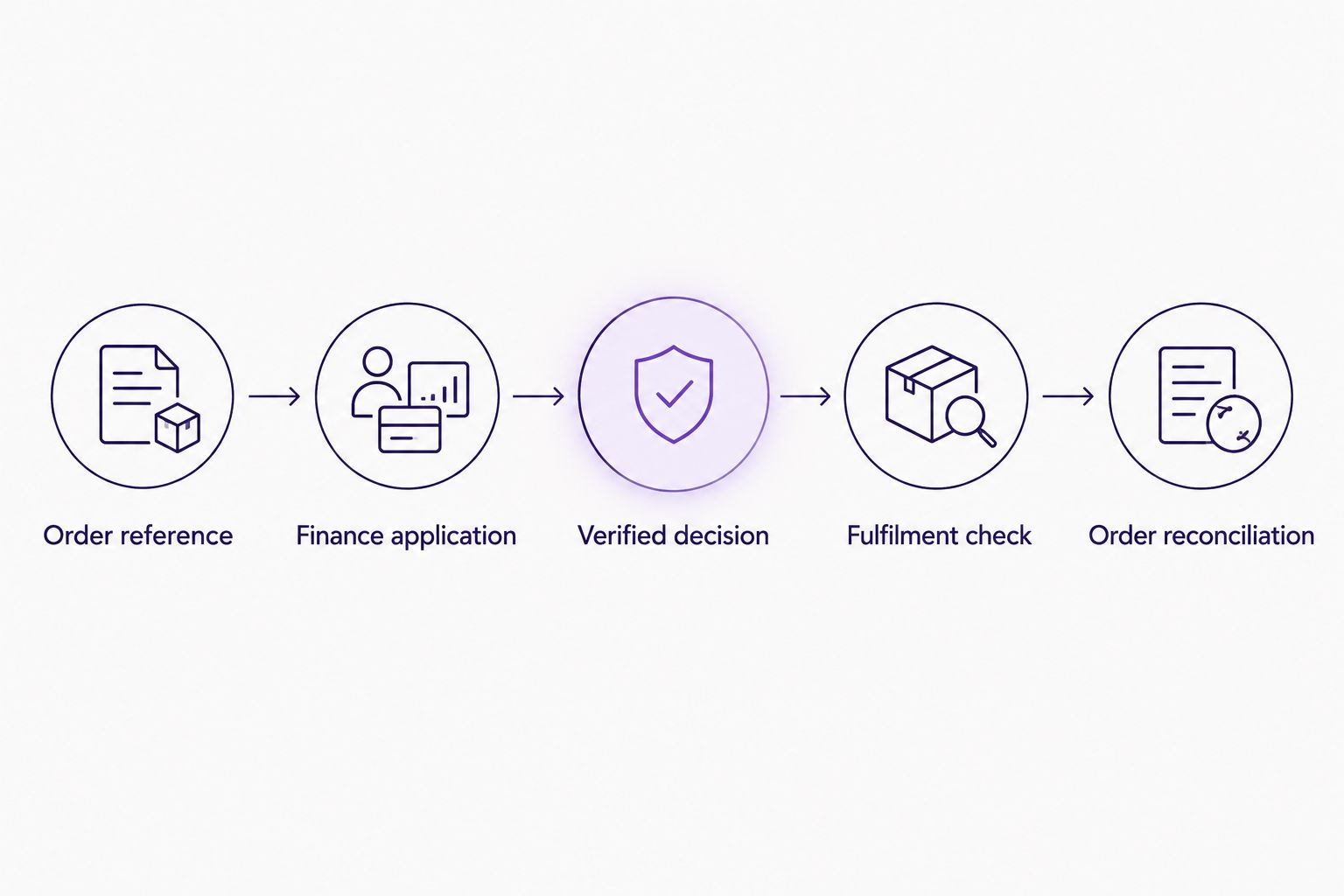
Use the following sequence as your implementation model. Each stage needs a defined outcome before the next stage can safely proceed.
- Order reference: Identify the purchase attempt.
- Finance application: Associate the customer's application with that reference.
- Verified decision: Obtain the authoritative outcome through the supported process.
- Fulfilment check: Confirm the provider's conditions for releasing the order are met.
- Order reconciliation: Keep the store and finance records aligned.
Do not place full application details in ordinary order notes. An order-management record should support fulfilment and reconciliation, not become a second store of unnecessary financial information.
Decision handling
Use the provider's authoritative outcome, not the customer's browser journey, to determine the next action. A success-looking page, a closed tab and a completed application form are different events from a confirmed finance decision.
Map outcomes to store actions
- List every outcome defined in the current provider documentation. Keep the provider's actual status names in your technical mapping rather than inventing equivalents that hide meaningful differences.
- Separate unfinished applications from confirmed outcomes. Establish whether pending, abandoned and declined journeys require different store actions under the supported process.
- Define the fulfilment gate. Confirm whether approval alone is sufficient or whether another documented event must occur before you release goods.
- Validate incoming confirmations using the provider's documented security method. Match the reference and purchase details before allowing the event to change the order.
- Make repeated processing safe. If the same confirmation is received again, the implementation should recognise the already-applied action rather than create another order or fulfilment instruction.
Expected result: Every documented outcome has an explicit store action, and repeated notifications cannot repeat the business action.
For your 2026 mapping, keep operational meanings distinct even if the store presents a simpler customer-facing message. Approval, permission to fulfil and reconciliation should not be treated as interchangeable without the provider's confirmation.
This is also where you decide who investigates exceptions. A pending application needs a different response from a technical failure, and neither should automatically become a decline message.
Checkout testing
A finance option is ready only when the complete purchase journey works, including the paths that do not end in approval. Test through the provider-approved process and avoid submitting fictitious live applications.
Run the acceptance checks
- Run 5 test orders covering successful completion, decline, abandonment, a repeated confirmation and a basket change. Use the outcomes and test identities permitted by the provider.
- Check 2 device types: a desktop browser and a mobile browser. Confirm that the customer can understand the finance choice, return to the store and recover from an interrupted journey.
- Compare 3 records for each completed test: the store order, the provider record and the fulfilment instruction. Confirm that their references and purchase details agree.
- Test a cancellation and the supported refund process. Establish which action belongs in BigCommerce, which belongs with the provider and how your team confirms completion.
- Review the customer messages. Explain that an application is subject to the provider's process; do not promise universal acceptance or a decision time you cannot substantiate.
- Approve the release only after the technical owner and operations owner have checked the results. Record unresolved issues instead of treating a working demonstration as launch approval.
Expected result: Your 2026 release record shows how the workflow behaves across successful, interrupted and unsuccessful journeys.
For the broader checkout sequence, use the guide to adding a buy now pay later option at checkout. Keep the BigCommerce-specific implementation tied to the current instructions for your confirmed connection.
Variant: handle a changed order before fulfilment
An order amendment needs its own workflow because the purchase associated with an application can change. Build this variant only where the provider supports amendments or a documented replacement process.
- Detect the change to the purchase details that matter to the agreement. Include product changes, delivery adjustments and cancellations in your review rules.
- Pause fulfilment while the change is assessed. Do not assume an earlier finance decision covers the revised purchase.
- Follow the provider's documented amendment or replacement procedure. Retain enough reference history to reconcile the original and revised records.
- Resume the order only after receiving the confirmation required for the revised purchase. Make the updated customer message consistent with that outcome.
Expected result: An amended order cannot bypass the same fulfilment checks applied to the original purchase.
Best for: Retailers whose customers regularly amend orders before dispatch. The benefit is clearer control over changed purchases; the trade-off is additional exception handling and a dependency on the provider's amendment process.
Do not use this variant to resubmit declined applications automatically. A changed basket is not permission to override the provider's application process.
Troubleshooting
The customer returns, but the order remains unfinished
Check the authoritative application outcome first. If the browser returned before confirmation arrived, reconcile through the supported process rather than manually marking the order as complete based on the return page.
A repeated confirmation triggers another action
Check whether the implementation records previously processed events and actions. Add duplicate detection at the business-action level so repeated delivery cannot create another fulfilment instruction.
The application and basket no longer match
Compare the purchase details associated with the application against the current order. Hold fulfilment and use the supported amendment or replacement process; do not force a match by editing references alone.
Customers cannot see the finance choice
Check the confirmed connection's eligibility and display rules, installation scope and storefront configuration. Ask the technical owner to reproduce the issue with the affected basket rather than assuming every missing finance option is an outage.
The cancellation is complete in only one system
Find the linked merchant and provider references, then reconcile the cancellation using the agreed procedure. Updating an order note is not a substitute for confirming the required finance-side action.
Customise your workflow
Start with one documented purchase journey, then expand after your team can reconcile it reliably. Add exception reporting for unmatched references, unresolved applications and cancellation mismatches before introducing more automation.
For PayItMonthly customer finance, confirm each additional capability directly rather than inferring it from a general integration plan. Keep checkout messaging, application handling and operations procedures aligned as the supported implementation changes.
Assign a named owner to your 2026 workflow documentation. Record the connection version, decision mapping, customer messages and escalation process so a later checkout change does not silently break finance handling.
Confirm your finance connection
Discuss your BigCommerce checkout requirements before committing to an implementation route.
FAQ
Does PayItMonthly have a native BigCommerce integration?
Confirm native BigCommerce compatibility directly with PayItMonthly before planning installation. Use the current supported connection instructions rather than assuming a connector exists.
What do I need for a BigCommerce buy now pay later integration?
You need a confirmed connection route, authorised store access, the required merchant access and documented order-handling rules. Establish how decisions reach your store and what permits fulfilment before changing checkout.
Does returning to checkout mean finance has been approved?
No. A browser return is not an authoritative finance decision. Use the provider's supported confirmation process and match it to the correct purchase.
Can every customer get approved for interest-free finance?
Do not promise approval to every customer. Explain that applications follow the provider's eligibility and decision process, using the wording approved for your implementation.
Should I dispatch an order as soon as finance is approved?
Dispatch only when the provider's documented fulfilment conditions are met. Confirm whether approval is sufficient or whether a further event is required.
What happens if the customer changes the order after applying?
Review the changed purchase through the provider's supported amendment or replacement process. Do not assume the original decision covers different purchase details.
How should I test the connection before launch?
Use the provider-approved testing procedure to check completion, decline, abandonment, repeated confirmations and changed baskets. Reconcile the store order, provider record and fulfilment instruction before release.
One last thing
Test a repeated confirmation, not just a successful application. A workflow that handles the first approval correctly but repeats the fulfilment action on the next notification is not ready for customers.
Make that check part of release approval, alongside order matching and cancellation handling. The useful automation is not merely moving an order forward; it is moving the correct order forward only when the agreed conditions are met.