Instead of manually copying a finance PayLink into every invoice email, connect the issued-invoice event to an eligibility check, an approved link-generation method and a logged customer message. For B2B invoices, confirm that the finance provider supports the business borrower before automating anything.
- To automate finance paylink on invoice, connect invoice issuance, eligibility checks, approved link generation and delivery logging.
- PayItMonthly provides UK merchants with interest-free customer instalments; confirm business-borrower eligibility before building a B2B workflow.
- Send a finance invitation, not an approval claim, and keep invoice settlement separate from message delivery.
- Prevent duplicate messages with a unique invoice reference and a persistent send record.
Why this matters
An invoice, a finance application and a payment are separate records. Treating them as interchangeable creates the wrong customer message or an incorrect accounts-receivable entry.
PayItMonthly provides UK retailers and merchants with buy-now-pay-later finance that lets customers spread purchases into interest-free monthly instalments. PayItMonthly customer finance is for UK merchants offering interest-free monthly instalments to their customers. That does not establish eligibility for lending to a business named on a B2B invoice.
For your 2026 implementation, make borrower eligibility the first gate. A company purchase, a sole-trader purchase and a personal purchase must not be treated as equivalent without the provider's confirmation.
Review the commercial structure in the guide to instalment plans for B2B invoice payments before deciding which invoices enter the workflow.
Before you start
- Accounts and access: obtain permission to read issued invoices, send customer messages and write workflow records. Confirm the provider-approved way to generate or retrieve a finance link, including whether automation is permitted.
- Approved materials: prepare the customer message, eligibility rules, required disclosures and a secure place for connection credentials. Ask the provider to confirm the wording and eligible borrower types for your 2026 launch.
- The gotcha: an invoice addressed to a business does not prove that a retail finance product supports that borrower. Stop unsupported transactions before link creation; do not substitute an employee's personal details to bypass the restriction.
This guide is a configuration blueprint, not a claim that PayItMonthly supplies a particular accounting connector, API operation or automation-platform action. Use the current documentation for the systems you actually operate. The record names below describe data you should retain, not existing interface labels or provider fields.
Invoice trigger configuration
Choose the event and eligibility gate
- Select invoice issuance as the starting event. Use the point at which your accounting process considers the invoice final and ready for the customer. Do not use draft creation or every invoice edit as the initial trigger.
- Retrieve the current invoice from the accounting system. Check the invoice identifier, customer reference, currency, outstanding balance and current status rather than relying only on the incoming event.
- Match the invoice customer to the intended borrower. Apply the provider's confirmed rules for borrower type, purchase purpose and transaction eligibility.
- Stop the workflow for drafts, cancelled invoices, settled invoices and unsupported transactions. Record the reason so staff can distinguish a deliberate exclusion from a technical failure.
- Confirm the recipient. Use the authorised customer contact for the finance invitation, not an internal salesperson or an unverified address copied from a note.
Expected result: only an issued, unpaid and eligible invoice reaches the next stage. An excluded invoice remains in the accounting process without receiving an inappropriate finance invitation.
Keep the eligibility decision separate from technical success. An automation can retrieve an invoice correctly and still be wrong to send finance information.
Choose the processing route
Use the least automated route that meets the provider's requirements and your operational needs. These are implementation choices, not claims about available product features.
| Processing route | Best for | Advantage | Limitation |
|---|---|---|---|
| Fully automated | Transactions with confirmed eligibility and an approved machine-accessible link method | Removes routine copying between systems | Requires reliable status checks, duplicate protection and error handling |
| Staff-reviewed | Transactions requiring an eligibility or recipient check | Keeps a person responsible for exceptions | Retains a manual approval step |
| Manual hand-off | Accounts without an approved automation method | Avoids an unsupported connection | Does not remove link creation work |
Start with staff review if any eligibility rule still requires interpretation. Full automation is the wrong choice when the business process itself remains undecided.
Invoice record and duplicate protection
Create the tracking record
- Create a durable workflow record keyed to the accounting system and its invoice identifier. Store it somewhere that remains available between automation runs.
- Retain the customer reference, invoice version or update marker, outstanding balance, eligibility decision and processing state. Keep unnecessary personal information out of diagnostic logs.
- Separate link creation from message sending in the record. Retain the returned finance reference, link reference and delivery result independently where the connected systems provide them.
- Reserve the invoice for processing before requesting a link. Use an atomic operation or equivalent locking mechanism so simultaneous runs cannot both proceed.
- Check the record before every retry. Resume the unfinished stage instead of restarting the entire workflow.
Expected result: repeated invoice events point to the same tracking record. A messaging retry does not automatically create another finance request.
For duplicate testing, deliver the same event 2 times and require 1 customer message. These are acceptance-test conditions, not performance claims. Repeat the test with overlapping runs, because sequential retries do not test concurrency protection.
Define the workflow states
Use distinct states for Eligibility check, Link creation, Customer message and Reconciliation. Record a failure against the stage where it occurred; a failed email must not look like a failed finance request.
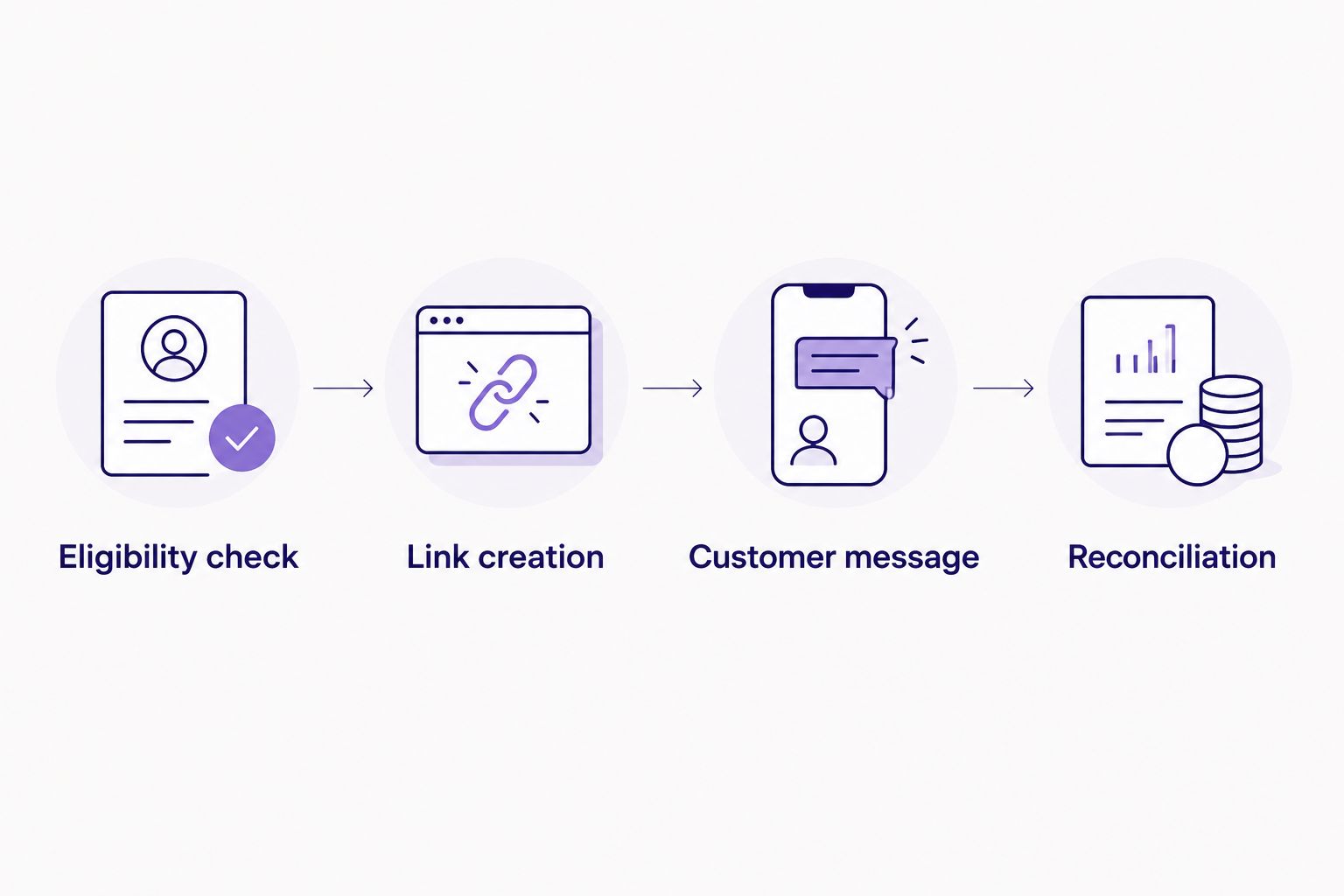
Your 2026 workflow record should also identify who owns exceptions. Assign eligibility questions to the finance-process owner and connection failures to the integration owner. A shared error inbox without ownership leaves invoices unresolved.
Finance link configuration
Map the invoice to the approved link method
- Confirm the supported link-generation method with the provider. Obtain the current instructions, required permissions and test procedure before connecting live customer data.
- Map only the information that method requires. Match the customer reference, transaction reference, currency and requested financed amount to the current invoice.
- Determine the amount from the provider-approved treatment of the outstanding balance. Account for deposits, credits and partial payments; do not assume the original invoice total remains correct.
- Submit the request using the supported authentication method. Keep secrets in the connection's credential storage rather than in customer messages or ordinary logs.
- Validate the response before continuing. Retain the finance reference and returned link, and route incomplete or ambiguous responses to review.
- Reuse the existing finance reference when recovering from a later messaging failure. If the original request timed out, establish whether it succeeded before creating another request.
Expected result: the tracking record contains a provider-generated link associated with the intended customer and current transaction amount, or a clear exception awaiting review.
Never build a finance URL by joining an assumed domain, invoice number and customer details. A plausible-looking URL is not an approved application link.
PayItMonthly offers interest-free customer instalments, but confirm the precise PayLink automation method and business-borrower scope directly before implementation. Do not treat an article title, an invoice field or a general finance description as technical integration documentation.
Customer message and reconciliation configuration
Send the invitation and retain the outcome
- Prepare a message that identifies your business, the invoice reference and the purpose of the finance link. Use provider-approved wording and disclosures.
- Explain that the link starts or continues the finance process. Do not describe an invitation as an approved agreement, a completed payment or guaranteed acceptance.
- Recheck the invoice immediately before sending. Stop if it has been cancelled, settled or changed in a way that invalidates the prepared link.
- Send through your authorised messaging system. Record the message identifier and send result against the invoice workflow record.
- Keep the invoice outstanding until your accounting policy and the relevant finance or payment evidence support a settlement entry. A successful send or a link click is not that evidence.
- Route delivery failures to a named staff queue. Correct the recipient or delivery problem without blindly repeating link creation.
Expected result: the intended recipient receives the correct invitation, staff can trace its delivery, and the accounting balance remains tied to payment evidence.
Test before releasing live messages
Run these 6 test cases for the 2026 release:
- An eligible issued invoice reaches the approved link and message stages.
- An unsupported borrower is stopped before link creation.
- A repeated event does not send another invitation.
- A partial payment changes the amount considered for finance.
- A settled or cancelled invoice is stopped before sending.
- A successful link request followed by a messaging failure resumes at delivery.
Use a provider-approved test arrangement and controlled recipients. Do not test by sending real finance invitations to unsuspecting customers.
Check your customer finance fit
Confirm borrower eligibility and the supported link workflow before connecting live invoices.
Recheck finance whenever an invoice is updated
An update workflow is useful when deposits, credit notes or revised orders change the outstanding balance after issuance. Its job is to reassess the existing invitation, not to send a fresh message after every edit.
- Retrieve the latest invoice and its existing workflow record.
- Compare finance-relevant information: borrower, currency, outstanding balance and cancellation or settlement status. Ignore edits that do not affect the finance transaction.
- If the invoice is settled or cancelled, stop further invitations. Follow the provider's process for any existing finance application or agreement.
- If the amount or borrower changes, ask the approved integration process to determine whether the existing link remains valid. Route uncertain cases to staff review.
- Send a replacement invitation only after confirming the correct treatment of the earlier link or application. Record why the replacement was necessary.
Best for: invoices that change before payment. The benefit is a link that stays aligned with the transaction; the drawback is extra state management and more exceptions to resolve.
Do not amend an existing finance agreement merely because the accounting invoice changed. Agreement changes, cancellations and refunds require their own approved process.
Troubleshooting
The workflow sends duplicate invitations
Check whether the send record is saved before another run can proceed. Use a unique invoice key, concurrent-run protection and a separate delivery state; a search followed by an unprotected insert is not sufficient.
The link shows the wrong amount
Compare the link request with the current outstanding balance, including deposits and credits. Pause further messages and follow the provider's correction process rather than assuming an existing link updates itself.
The finance request times out
Treat the outcome as unknown, not automatically failed. Look up the transaction through a supported reference or ask the provider to verify it before retrying creation.
The invoice event never starts the workflow
Check connection permissions, the event subscription or polling setup, and whether your system distinguishes invoice creation from issuance. Replay a controlled event only after checking for an existing processing record.
Finance is offered to an unsupported business buyer
Disable that eligibility route immediately. Review borrower classification and customer matching, then check affected records before re-enabling sends; technical delivery success does not make an ineligible offer appropriate.
Customise your workflow
Extend the workflow only after issuance, duplicate handling and reconciliation pass testing. Add a staff-review queue for unusual transactions, exception notifications for unresolved failures and an audit record of configuration changes.
For a 2026 operating review, measure eligible invoices, completed sends, duplicate sends prevented and unresolved exceptions using your own records. Keep these separate from completed agreements and settled invoices so a high message count cannot disguise an accounting problem.
PayItMonthly customer finance should remain an optional, accurately explained payment route within the approved transaction scope. Keep your ordinary invoice process available rather than making every recipient pass through a finance application.
FAQ
How do I automate a finance PayLink when an invoice is issued?
Connect invoice issuance to an eligibility gate, a provider-approved link method and a logged messaging step. Add duplicate protection and recheck the invoice before sending.
Can PayItMonthly finance a B2B invoice automatically?
Confirm business-borrower eligibility and the supported automation method with PayItMonthly before building the workflow. Its stated customer-instalment offering does not establish support for every B2B borrower or invoice.
Do I need an API to send finance links automatically?
You need a provider-approved way to create or retrieve the link, but that does not necessarily mean a custom API integration. Use a supported connector or staff-reviewed hand-off where appropriate.
Should I mark the invoice paid when the finance link is sent?
No. Sending a finance link is a messaging event, not evidence that the invoice has been settled. Reconcile against the relevant finance or payment records under your accounting policy.
How do I stop duplicate finance emails?
Store a persistent processing record against the unique invoice identifier and protect it against concurrent runs. Track link creation and message sending separately so delivery retries do not restart the finance request.
What happens if the customer makes a partial payment?
Recheck the outstanding balance before sending or replacing a finance invitation. Confirm the provider's treatment of an existing link or application rather than assuming it changes automatically.
Can I resend the link whenever an invoice changes?
Do not resend after every edit. Reassess only finance-relevant changes, confirm whether the existing link remains valid and send a replacement only through the approved process.
One last thing
Test the moment between link creation and message delivery. If the link succeeds but the message fails, your workflow must recover without creating another finance request. That boundary deserves an explicit acceptance test before your first live invoice.