
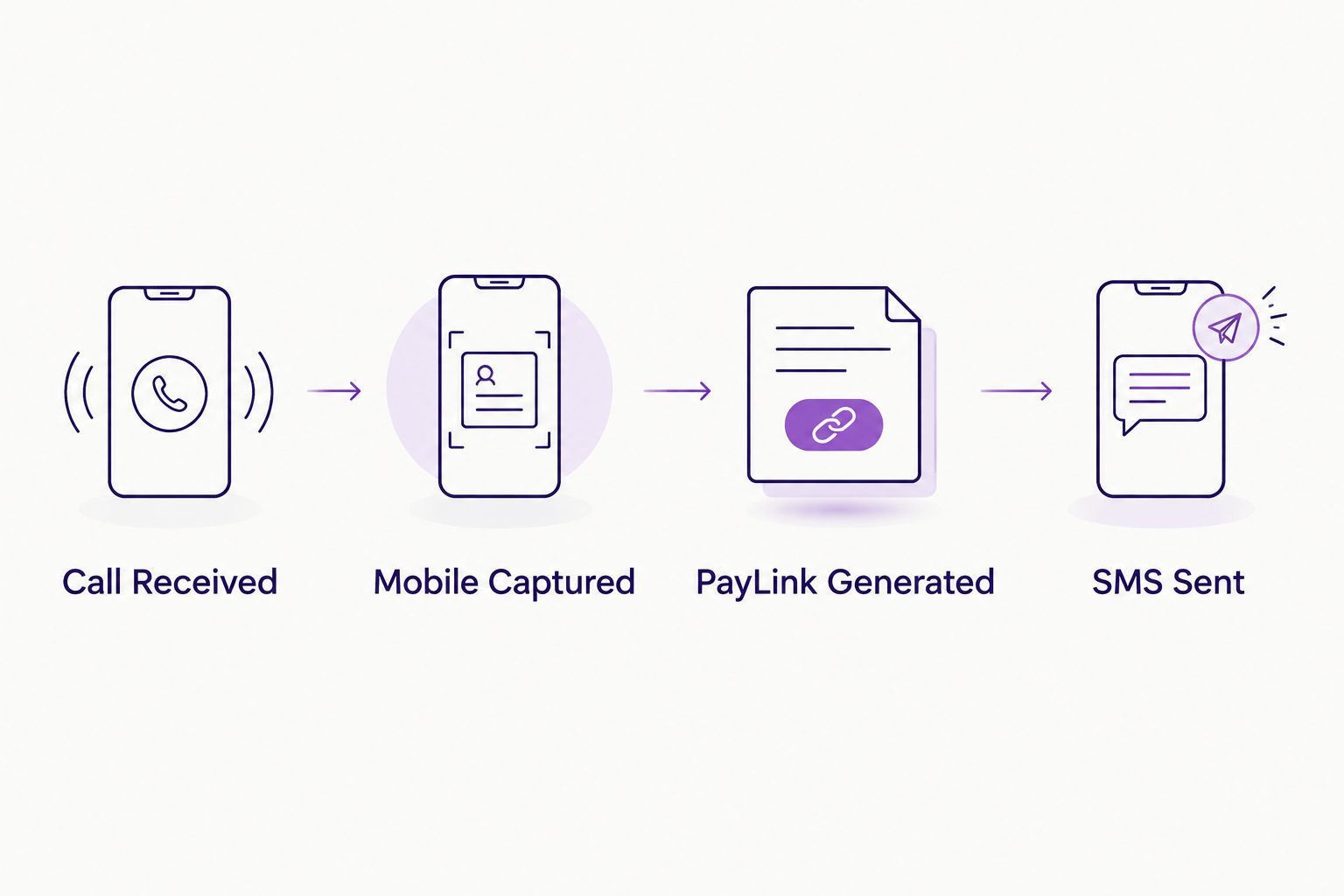
Instead of emailing a finance application after you hang up and hoping the customer finds it before they lose interest, send finance link by text for phone order the second the call ends — the PayLink lands on their phone while they're still holding it, and they apply from the sofa instead of digging through an inbox later.
- Texting a PayLink straight after a phone order closes the gap between quote and application instead of leaving it open overnight.
- PayItMonthly's PayLink can be generated mid-call and sent by SMS without the customer ever opening an email.
- A UK mobile number (not a landline) is the one thing that makes this workflow work in 2026 — confirm it before you generate the link.
- The same send-finance-link-by-text workflow also fits accepted quotes, not just live phone orders.
Why this matters
Phone order customers don't behave like checkout customers. They've already spoken to a person, they're emotionally closer to buying, and they expect the next step to be instant — not "check your email in ten minutes." If the finance application arrives by text while they're still on the sofa, they apply there and then. If it arrives an hour later in an inbox they don't check until evening, the sale cools.
Businesses that take orders by phone — home improvement firms, furniture retailers, clinics booking high-ticket treatments — lose more deals in that gap than anywhere else in the funnel. Fixing it isn't a technology problem in 2026, it's a sequencing problem: generate the PayLink while the customer is still talking to you, and send it the way they're already holding their phone — as a text, not an email.
Before you start
- An active PayItMonthly merchant account with PayLink access switched on for your order process.
- A place in your phone order script to capture the customer's mobile number, not just a contact number — landlines can't receive the text and the workflow silently fails if that's all you captured.
- Written or verbal consent to text the customer a payment link, noted against the order — this matters for your own records, not just good practice.
The gotcha that catches people at step three, not step one: if your phone order form still has a single "contact number" field instead of a dedicated mobile field, staff will enter whatever number the customer gives first. Split that field before you build anything else, or half your PayLinks will go nowhere.
Set up your phone order trigger
- Open the order record you use while taking the call — whether that's your CRM, your till system, or a simple order form.
- Add a mobile number field if one doesn't already exist, positioned near the top of the form so it's captured early, not as an afterthought at checkout.
- Add a tick-box or note field for SMS consent given directly under it.
- Save the order as normal once the customer has confirmed what they want.
Expected result: every phone order now carries a verified mobile number and a consent flag before anyone touches the finance step.
Generate the PayLink during the call
- With the order details confirmed, open your PayItMonthly merchant dashboard and start a new PayLink for that order value.
- Enter the order total and the customer's mobile number into the link generator.
- Select send by SMS rather than email, where both options are offered.
- Confirm and generate — the link is created against that specific order, not a generic finance page.
Expected result: a one-time PayLink tied to this order, ready to send, generated in under a minute while the customer is still on the line.
Send the SMS automatically
- Trigger the send immediately after generation rather than batching it with other admin at the end of the day.
- Tell the customer on the call that the text is on its way, and give them a rough sense of how quickly it'll arrive — this stops them hanging up confused if it's not instant.
- Log the send against the order record so your team can see at a glance whether the customer has applied yet.
Expected result: the customer has the PayLink in their messages before the call ends, and your order record shows "PayLink sent" instead of "awaiting payment details."
Do the same thing when a quote is accepted
Phone orders aren't the only moment this matters. If your business sends written quotes before a sale closes — trade jobs, bespoke furniture, home improvement work — the same logic applies the second the customer says yes. Sending a finance PayLink the moment a quote is accepted uses an identical trigger-and-send pattern, just fired from quote acceptance instead of a live call. Businesses running both phone orders and quoted jobs can run both workflows side by side without building two separate processes.
Troubleshooting
- The customer says they never got the text. Check the number entered against the order — a single transposed digit is the most common cause, and a landline entered by mistake is the second.
- The link was sent but the customer hasn't applied. Send one follow-up text rather than a phone call for low-value orders; a text feels less pushy and the customer already expects a message from you.
- Staff are sending links by email out of habit. Make SMS the default option in your dashboard settings rather than relying on staff to remember to switch it each time.
- The order value changes after the PayLink is sent. Generate a fresh PayLink for the corrected amount rather than asking the customer to adjust anything themselves — a mismatched link causes more support queries than it saves.
Customize your workflow
Once the phone-to-SMS flow is reliable, the obvious next step is wiring it directly into whatever system you already take orders through, instead of using the dashboard as a manual middle step. Connecting PayItMonthly's API to your existing checkout covers that build for teams ready to automate the link generation itself rather than triggering it by hand on every call.
FAQ
How do I send a finance link by text for a phone order?
Capture the customer's mobile number during the call, generate a PayLink in your PayItMonthly dashboard for that order's value, and send it by SMS instead of email before the call ends. The customer applies directly from the text in 2026 without needing to check an inbox.
Does the customer need an email address to use a PayLink?
No — a PayLink sent by SMS only requires a mobile number. This matters for phone order businesses where customers rarely give an email address during the call.
What happens if I enter a landline instead of a mobile number?
The SMS will not deliver and the PayLink effectively goes nowhere. Splitting your order form into a dedicated mobile number field prevents this from being a recurring problem.
Can I text a PayLink for a quote as well as a phone order?
Yes. The same trigger-and-send pattern works when a quote is accepted, not just during a live call — fire the text the moment the customer confirms rather than waiting for a follow-up conversation.
Is sending a PayLink by text better than email for phone orders?
For customers you've just spoken to on the phone, yes — they're holding their mobile, not sat at an inbox. Text delivery closes the gap between the call ending and the application starting.
What if the customer doesn't apply after getting the text?
Send one follow-up text rather than calling back immediately. A second phone call this soon after the order feels pushy; a short text reminder doesn't.
Can I automate this without manual dashboard steps?
Yes, once the manual process is reliable, connecting PayItMonthly's API to your order system removes the manual generate-and-send step entirely.
One last thing
The single biggest point of failure in this whole workflow isn't the technology — it's the mobile number field. Teams that split "contact number" into a dedicated mobile field before launching this process in 2026 see far fewer dead PayLinks than teams that bolt SMS sending onto an existing form and hope staff enter the right kind of number. Fix the field first, build the automation second.