
Instead of manually matching finance applications to checkout orders, build your PayItMonthly API integration around a server-side order reference and verified finance status. Your checkout should start the documented finance journey, retain the matching reference and release the order only when the provider's documented fulfilment conditions are met.
- Build your PayItMonthly API integration around server-side validation, order matching and verified finance status.
- PayItMonthly provides UK retailers with buy now pay later through interest-free monthly instalments.
- Keep API credentials out of browser code and use the authentication method specified in merchant documentation.
- Test abandoned journeys, repeated submissions and order changes before enabling checkout finance.
Why this matters
A checkout integration has two jobs: help the customer enter the finance journey and keep your order records accurate. A successful browser redirect does not prove that an order meets the conditions for fulfilment. Treat the customer-facing journey and the merchant's fulfilment decision as separate processes.
PayItMonthly is best for UK retailers seeking interest-free monthly instalments for their customers. Start with PayItMonthly to establish the merchant requirements, then make the current technical documentation your implementation contract.
For a 2026 checkout build, prioritise correctness before presentation. A clear payment choice matters, but accurate order matching, controlled retries and a recoverable cancellation journey matter just as much.
Before you start
- Merchant access and the current API contract: Obtain the approved authentication instructions, request definitions, response definitions and permitted customer journey. Confirm the test process and production activation requirements before writing the connector.
- Checkout and backend access: You need a developer who can change the payment selection, create server-side requests, store provider references and control order fulfilment. Assign an operational owner for finance exceptions and customer support.
- The gotcha: a return page is not payment confirmation. Establish the documented source of finance status before connecting your success page to fulfilment. Also confirm what happens when a customer changes the basket after starting finance; do not assume an existing application can be edited.
Make those decisions part of your 2026 implementation brief. Record who owns technical failures, customer questions and order reconciliation so an unresolved application does not become an unowned support task.
Merchant configuration
- Confirm the supported checkout journey. Establish how your checkout starts the customer journey and how the customer returns. Follow the documented mechanism rather than choosing an embedded form or redirect based on preference.
- Record the fulfilment conditions. Identify which documented status permits the next merchant action. Record the treatment of incomplete, unsuccessful and cancelled journeys separately.
- Configure authentication on the server. Use the exact method specified in the API documentation. Store credentials in your deployment's secret-management facility, not in theme files, browser scripts or a public repository.
- Separate testing from production. Follow the provider's documented testing arrangements. Keep test configuration distinct from production configuration and prevent test orders from reaching fulfilment.
- Agree the customer wording. Use approved descriptions of interest-free monthly instalments and the applicable terms. Do not promise acceptance or describe a finance application as a completed purchase.
Expected result: Your developer has an agreed authentication method, customer journey and status-to-action mapping. Your operations team knows which orders must remain on hold.
Keep a short configuration record with the documentation version or access date, deployment environment and responsible owner. For a 2026 release, that record helps the next developer distinguish an intentional implementation decision from an old assumption.
Do not collect extra customer information simply because your checkout can store it. Map only the information required for the documented request and your legitimate order-management needs.
Order mapping
- Create the merchant order reference first. Generate a stable reference on your server before starting finance. Keep that reference associated with the checkout attempt and the customer's basket.
- Calculate the order amount on the server. Recalculate the payable total from your order records. Do not trust an amount submitted by browser code without validating it against the current basket.
- Map the documented request fields. Use the exact field names, data types and amount format in the API contract. Do not substitute guessed names or assume that amounts use pounds rather than minor currency units.
- Store the documented response references. Save the provider's returned identifiers against your merchant order. Preserve the distinction between your order reference and the provider's reference.
- Control repeated submissions. Disable accidental repeat submission in the interface and enforce duplicate protection on the server. Use the provider's documented duplicate-request mechanism if one exists; do not invent an unsupported header.
- Record the basket version. Associate the finance attempt with the order details used to create it. A later basket change must not silently reuse a finance attempt created for different details.
Expected result: Every finance attempt maps to a known merchant order and the order details submitted for that attempt. Support staff can trace the relationship without searching customer names.
A finance reference is a matching key, not proof that you can fulfil an order. Keep those responsibilities separate in your database and application logic.
Use this workflow as the structure for the integration, while keeping the provider's actual request and response definitions in your implementation documentation.
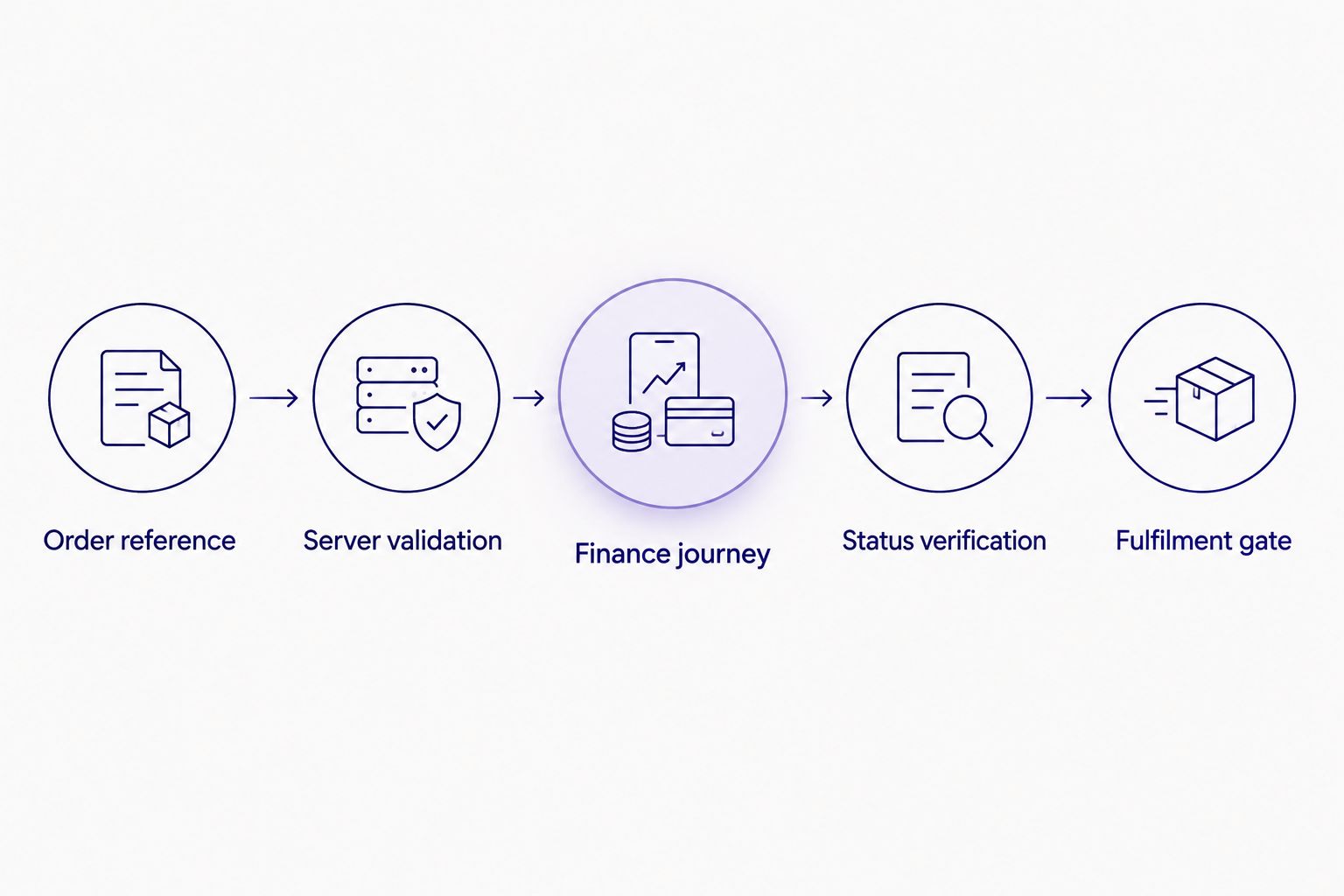
Status verification
- Start the documented finance journey. Submit the validated order data through your backend. Give the customer the next action specified by the integration contract.
- Keep the order pending during the journey. Present an appropriate waiting state in your order system. Do not send a dispatch instruction merely because the application was created.
- Implement the documented status mechanism. If the contract specifies notifications, implement its verification requirements. If it specifies status requests, follow that process instead. Do not assume both mechanisms exist.
- Validate the matching order. Before acting on a status, match the provider reference to the merchant order and check the relevant order details. Reject an unmatched response from automatic processing and send it for investigation.
- Make order updates repeat-safe. Processing the same confirmed outcome twice must not create duplicate fulfilment tasks, emails or accounting entries. Store the transition before triggering downstream work.
- Apply the fulfilment gate. Release the order only when the documented conditions are satisfied. Keep incomplete or unresolved attempts outside the fulfilment queue.
Expected result: Your order system reflects verified finance information rather than browser behaviour. Repeated processing does not create repeated merchant actions.
Customer return pages should explain the current state without overstating it. If confirmation is unresolved, tell the customer that the order is awaiting confirmation and provide a route for assistance.
For your 2026 launch, write the status mapping down in plain English as well as code. Customer service should understand why an order is pending without needing to interpret an API response.
Checkout testing and release
- Test the successful journey. Verify the order reference, submitted details, returned identifiers, confirmed status and permitted merchant action from start to finish.
- Test 6 failure scenarios. Include an abandoned journey, an unsuccessful application, a request timeout, repeated submission, a browser return without confirmed status and a basket change after finance starts.
- Run a duplicate-processing check. Submit the same checkout action 2 times and process the same confirmed outcome 2 times. The intended result is 1 fulfilment task for the order, not repeated dispatch instructions.
- Check customer messages. Verify that the checkout distinguishes an application in progress from an order ready for fulfilment. Preserve a clear route back to other payment methods when the journey ends unsuccessfully.
- Review operational access. Give authorised staff the information needed to trace an order while restricting credentials and sensitive customer data. Check that application logs do not expose secrets.
- Release with a rollback plan. Keep a way to disable the finance entry point without breaking other checkout methods. Assign someone to inspect unresolved orders after deployment.
Expected result: The release has tested order handling, understandable customer messages and a named response to failures. Your other checkout methods remain usable if the finance entry point is disabled.
These test counts are an implementation checklist, not a claim about provider performance. Extend the checklist to cover the actual behaviour described in the API contract and your checkout's own customisations.
When the basket changes after finance starts
A basket update needs a separate workflow because the original finance attempt belongs to the earlier order details. Do not carry a previous fulfilment decision across to a changed order without following the provider's documented process.
| Workflow | Best for | Advantage | Limitation |
|---|---|---|---|
| Fixed basket workflow | A checkout whose order details stay unchanged during finance | Keeps the order and finance attempt aligned | Requires a clear way to handle requested changes |
| Revised basket workflow | A checkout that permits changes during the finance journey | Allows customers to revise their purchase | Needs explicit handling of the previous finance attempt |
For a fixed basket workflow, prevent silent edits once the finance journey starts. Explain how the customer can return to checkout if they need to change their purchase.
For a revised basket workflow:
- Detect that the submitted order details have changed.
- Stop the previous attempt from triggering automatic fulfilment of the revised order.
- Follow the documented process for amendment, cancellation or a replacement attempt.
- Associate any new attempt with the revised basket version.
Expected result: Your revised order does not inherit finance confirmation for different order details. Keep an audit trail connecting the original attempt, the change and the replacement action.
Troubleshooting
Authentication fails
Check the documented authentication format, credential configuration and environment. Confirm that your deployed backend reads the intended secret; never paste credentials into browser code to bypass a server-side problem.
The customer returns, but the order stays pending
Check the documented status source and the stored provider reference. A browser return alone is not a reason to release the order. Investigate the confirmation path and show the customer a truthful pending message.
A timeout leaves the result uncertain
Treat a timeout as an unknown result, not an automatic failure. Use the documented lookup or recovery procedure before retrying. Blindly repeating a request risks creating another finance attempt for the same order.
The same outcome triggers duplicate actions
Check whether your order transition and downstream task creation are repeat-safe. Enforce a single permitted transition and prevent a previously processed outcome from generating another fulfilment task.
Finance details no longer match the basket
Compare the stored basket version with the current order. Hold fulfilment and use the documented amendment or cancellation process. Do not overwrite the original submitted details to make the records appear aligned.
Customise your workflow
A PayItMonthly buy now pay later checkout should fit your order operations, not create a separate manual queue that nobody owns. Add an exception view that shows the merchant order reference, provider reference, current mapped state and next required action.
The benefit of a custom connector is control over your checkout and order handling; the trade-off is ongoing maintenance. Your business owns the testing, monitoring and updates required when either side of the integration changes.
After the core workflow passes testing, improve the surrounding payment journey with the guide to adding a buy now pay later option at checkout. Keep finance selection clear and avoid turning the payment step into a long explanation page.
For 2026 maintenance, repeat the relevant tests whenever you change checkout calculations, order statuses or fulfilment rules. A visual checkout update can still affect the data your connector receives.
FAQ
How do I connect PayItMonthly to my existing checkout?
Build the connector against the current merchant API documentation, with server-side requests, stable order references and verified finance status. Release orders only when the documented fulfilment conditions are met.
Can I put finance API credentials in my checkout JavaScript?
Keep secret API credentials out of checkout JavaScript. Store them server-side and follow the provider's documented authentication method.
Does a successful return page mean I can dispatch the order?
A successful browser return does not establish that an order meets the conditions for fulfilment. Verify the documented finance status before releasing the order.
What should happen if a finance request times out?
Treat a timeout as an unresolved result and follow the documented recovery process. Check whether the original attempt exists before repeating the request.
Can a customer change the basket after starting finance?
Handle a changed basket through the provider's documented amendment, cancellation or replacement process. Do not apply confirmation for the original details to a revised order automatically.
What should I test before launching the integration?
Test successful completion, abandonment, unsuccessful applications, timeouts, duplicate processing and changed order details. Verify that unresolved finance attempts cannot trigger fulfilment.
Who should own a custom checkout integration?
Assign a technical owner for the connector and an operational owner for unresolved orders. The technical owner maintains request handling and security; the operational owner manages exceptions and customer communication.
One last thing
Test what happens when the customer never returns to your checkout. Close the browser during the journey and check whether your order system still reaches the correct state through the documented confirmation process. This tests whether order correctness depends on the customer keeping a page open.