
Yes, you can switch buy now pay later providers without downtime if your checkout supports a controlled changeover and the replacement is ready before you remove the existing option. A working checkout does not guarantee uninterrupted finance availability: protect in-progress applications, existing agreements and refunds separately, and keep a tested way to reverse the change.
- To switch buy now pay later providers without downtime, test the replacement before removing the existing checkout option.
- Keep ordinary checkout payments working, and treat existing finance agreements separately from new applications.
- Use a staged changeover only where your platform, contracts and providers support it.
- PayItMonthly provides buy now pay later for UK businesses offering interest-free monthly instalments; confirm migration requirements before committing.
Why this matters
A provider switch is not finished when the new payment button appears. Your customer must complete the application, return to the correct order and receive an accurate confirmation. Your team must also know which provider handles each transaction afterwards.
For a 2026 migration, make checkout continuity an acceptance condition rather than an assumption. Use the criteria in how to compare finance providers before switching to separate the replacement's suitability from the practical work of changing providers.
Agree what downtime means before setting a launch date. A shop that still accepts card payments has checkout continuity, but it has not maintained continuous BNPL availability if customers temporarily lose the instalment option.
Can I switch buy now pay later providers without checkout downtime?
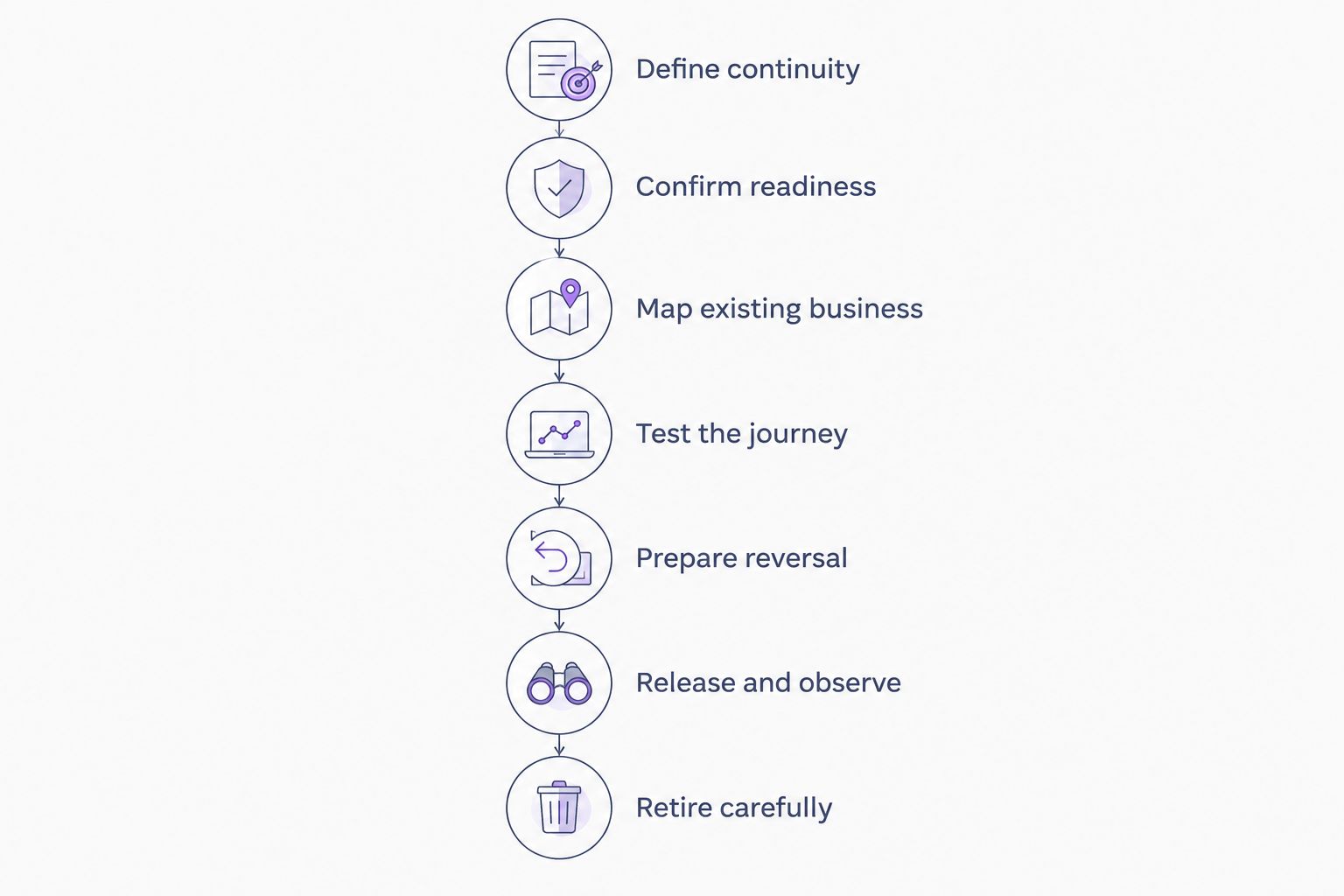
Yes, provided you can prepare and validate the replacement without breaking the live payment journey. Use the following sequence as your migration plan, and require evidence at each stage rather than relying on an installation confirmation.
1. Define continuity
Write down the journeys that must remain usable: ordinary checkout payments, new finance applications, applications already underway and access to existing orders. Include mobile checkout and any other sales channel you actually use.
Set separate pass conditions for checkout availability and finance availability. If continuous instalment access is essential, a temporary card-only checkout does not meet your requirement, even though customers can still place orders.
2. Confirm readiness
Ask the replacement provider to confirm merchant approval, the supported connection method and any remaining activation steps. Ask your ecommerce developer what can be prepared without changing the live checkout.
Do not equate access to a merchant account with permission to take live applications. Record who confirms readiness, what evidence they need and which outstanding tasks block launch.
3. Map existing business
Create a record of outstanding applications, completed finance orders, unfulfilled orders, returns and unresolved disputes. Keep the original provider's transaction reference alongside your order reference.
Ask the outgoing provider how each category must be handled after new applications stop. Do not treat a checkout replacement as a transfer of existing customer agreements. Confirm any proposed transfer separately with the parties responsible.
4. Test the journey
Use a test environment where one is available. Check the customer journey through application, return to checkout, order confirmation and the merchant's order record, following the provider's approved testing process.
Test cancellation and failure as deliberately as success. A declined or abandoned application must not leave an order looking paid, and a repeated notification must not cause duplicate fulfilment. Confirm how your integration handles each outcome.
5. Prepare reversal
Document how to restore the last working checkout configuration. Include the settings, permissions and person needed to make that change, plus the circumstances that trigger it.
A reversal plan must also address customers already using the replacement. Restoring an old button does not by itself resolve a finance application started through the new provider.
6. Release and observe
Choose a release window when your developer, operations lead and relevant support contacts are available. Avoid combining the provider switch with unrelated checkout changes; otherwise, diagnosing an error becomes harder.
Compare the customer-facing result with the order record and provider record. Investigate mismatches before expanding a staged release or declaring the change complete.
7. Retire carefully
Stop sending new applications to the outgoing provider only when the replacement meets your agreed acceptance conditions. Remove obsolete customer-facing messages as part of the same controlled change.
Keep the access and records needed for outstanding business, subject to your agreements and data-retention obligations. Account closure is a separate decision from removing a checkout option.
Which changeover approach fits your checkout?
Choose a method your platform and provider agreements actually support. The following approaches are planning options, not a statement that every BNPL integration offers them.
| Approach | Best for | Advantage | Limitation |
|---|---|---|---|
| Parallel preparation | Merchants able to configure the replacement without publishing it | Lets you prepare before changing the customer journey | An unpublished setup still needs validation in its live context |
| Staged release | Merchants with supported controls for limited exposure | Limits the initial scope of the change | Requires reliable routing and clear ownership of each application |
| Direct replacement | Merchants whose checkout cannot support a staged release | Keeps the release process concentrated in a single change | Places greater importance on pre-release testing and reversal |
Parallel preparation is not the same as displaying competing finance options together. You can plan and test a replacement without assuming both providers can appear at checkout simultaneously.
For your 2026 release plan, write down the chosen method and its constraints. If a staged release is unavailable, do not describe a direct replacement as staged simply because the launch happens during a quieter trading period.
Parallel preparation: verify before publishing
Prepare settings, customer-facing wording and internal procedures while the existing checkout remains unchanged, where your setup permits it. The benefit is separation between preparation and release; the limitation is that preparation alone does not prove the live journey works.
Staged release: keep application ownership clear
Use limited exposure only when the integration supports it and your agreements permit it. Decide how an application stays associated with its originating provider, including when the customer returns later to finish.
Direct replacement: make reversal practical
A direct replacement needs a clear release owner and a documented restore procedure. Its simpler routing does not remove the need to test order status, cancellations and finance records after publication.
Why the risk of downtime varies
The changeover method is only part of the decision. Confirm these factors for your own checkout rather than accepting a generic promise of uninterrupted service:
- Platform controls: Establish whether you can prepare privately, limit exposure and restore the previous configuration without unrelated changes.
- Provider readiness: Confirm that approval and activation requirements are complete before inviting customers to apply.
- In-progress applications: Establish what happens when a customer starts before the switch and returns afterwards.
- Order updates: Confirm how the checkout receives and records successful, failed, cancelled and delayed outcomes.
- Existing obligations: Document how outstanding orders, refunds, disputes and account access work after the changeover.
- Operational cover: Name the people who can diagnose problems, change settings and answer customer questions during release.
These are checks to resolve before launch, not reasons to promise a particular migration duration. Set the date around readiness, not the other way round.
What should I check before approving the switch?
Use a short acceptance record that connects every check to evidence. A tick beside installation is not enough; the record should show what the customer sees and what your team receives.
| Check | Evidence to retain | Reason to pause |
|---|---|---|
| Customer journey | Recorded outcome from the approved testing process | The customer cannot return to the correct checkout state |
| Order status | Matching order and provider references | Finance status and fulfilment status disagree |
| Failure handling | Results for cancellation, decline and interrupted journeys | An incomplete application creates a paid-looking order |
| Existing business | Written handling instructions from the outgoing provider | Refund or dispute ownership remains unclear |
| Reversal | Named owner and documented restore procedure | Nobody can explain how to restore checkout safely |
Keep this record with your 2026 release notes. Include the configuration changed and the person approving publication, so a later support issue has a clear starting point.
Before release, brief customer support on the distinction between old and new finance orders. Give staff a lookup process based on the order reference, not an instruction to guess from the purchase date.
Where does PayItMonthly fit into a provider switch?
PayItMonthly is for UK retailers that want to offer interest-free monthly instalments. Its buy now pay later platform serves businesses offering customers a way to spread purchases; that category fit does not establish compatibility with your particular checkout.
Review PayItMonthly against your requirements, then request confirmation of the migration details that matter to your business. Ask about the supported connection method, merchant activation, application handling and the responsibilities of each party during release.
The relevant benefit is access to interest-free monthly instalments for your customers. The limitation for migration planning is straightforward: a product description is not a downtime guarantee. Keep the decision to adopt a provider separate from approval to publish the checkout change.
Review your instalment payment requirements
Assess interest-free monthly instalments for your business before planning the checkout change.
Do I need to keep the old provider account open?
Keep the outgoing account accessible until you have confirmed how outstanding business will be handled. Removing the checkout option and closing the merchant account are different actions.
Ask for written instructions covering refunds, disputes, reporting and outstanding transactions. Retain access only as required by your arrangements and obligations, and assign responsibility for reviewing when it can end.
Can I keep taking orders if the new finance option fails?
You can keep taking orders through other payment methods only if those methods remain working and suitable for the purchase. Test them after the change rather than assuming a finance-only update cannot affect the rest of checkout.
Do not automatically replace a failed finance application with another payment choice. Let the customer choose, and avoid creating another application or order without a deliberate customer action.
Will my customers need to reapply after the switch?
Do not assume customers need to reapply merely because you change the checkout provider. Establish how the outgoing provider treats existing agreements and unfinished applications, then give customers instructions that match their actual status.
Keep that guidance consistent across checkout, confirmation messages and support responses. For a 2026 changeover, remove outdated provider references wherever they would direct a new applicant to the wrong journey.
FAQ
Can I switch buy now pay later providers without downtime?
Yes, if your checkout supports a controlled changeover and the replacement is ready before the existing option is removed. Test the full journey and keep a documented reversal procedure; uninterrupted service is not automatic.
Does keeping card payments live count as no BNPL downtime?
No. Working card payments preserve a way to place orders, but they do not preserve access to monthly instalments. Set separate acceptance conditions for checkout continuity and finance availability.
Can I show both BNPL providers during the switch?
Only show both providers if your checkout supports that arrangement and the relevant agreements permit it. Preparing a replacement privately does not require displaying both options to customers.
Do existing finance agreements automatically move to my new provider?
No automatic transfer should be assumed when you replace a checkout option. Confirm the handling of existing agreements and any proposed transfer with the responsible parties.
What should I test before switching finance providers?
Test successful, declined, cancelled and interrupted journeys, plus order updates and the approved refund process. Check other checkout payment methods after the change as well.
When should I remove the old finance integration?
Remove the old customer-facing option after the replacement meets your agreed acceptance conditions. Retain any access needed to handle outstanding transactions under your arrangements.
Does PayItMonthly guarantee a switch without checkout downtime?
Do not treat the choice of a buy now pay later provider as a downtime guarantee. Confirm the supported migration process for your checkout before agreeing a release date.
One last thing
The last old-provider transaction matters as much as the first new-provider transaction. A successful new application does not prove that your team can still refund an earlier order or identify an application started before the switch.
Before signing off your 2026 migration, trace an outstanding old-provider order through its next operational step. Confirm who handles it, which reference they use and where they record the result. That check tests the handover, not just the new button.