
Instead of manually matching finance applications to till sales, set up a point of sale finance workflow that links each purchase to its finance record and checks completion before fulfilment. Start by confirming the supported connection method for your exact till, then configure references, payment recording and exception handling before launch.
- PayItMonthly suits UK retailers offering interest-free monthly instalments; confirm till compatibility before configuring point of sale finance.
- Connect the sale and finance record with one order reference, not customer names alone.
- Keep application progress, sale completion and merchant settlement separate in your checkout process.
- Test completed, unfinished and cancelled purchases before introducing buy now pay later at the counter.
Why this matters
PayItMonthly is best for UK retailers seeking interest-free monthly instalments for their customers. Its buy now pay later platform lets customers spread purchases, but your till still needs a clear way to record what happened to each sale.
A point of sale finance connection is more than a payment option on a screen. Your checkout process must connect the basket, the customer's finance journey, the sale record and any later cancellation. Otherwise, staff have to interpret separate records while the customer waits.
For a 2026 rollout, define the handover between those records before changing your checkout. An application being started is not the same as a completed purchase, and neither tells you by itself that merchant settlement has occurred.
Build around confirmed transaction states, not assumptions about what a button does. The setup below is a merchant-side workflow guide: use your till supplier's instructions for the actual controls and your finance provider's instructions for the finance process.
Before you start
- Access and approval: Have authorised access to your till configuration, finance account and transaction reports. Confirm that your merchant setup permits the intended in-store journey before training staff to offer it.
- Connection details: Record the till supplier, software version, store configuration and supported finance connection method. Ask both providers who configures the connection, how transactions are matched and what staff must do when the process stops.
- The non-obvious gotcha: A payment category on a till records a sale; it does not establish that a finance agreement is complete. Confirm the provider-defined completion condition and fulfilment instruction before creating your checkout procedure.
Get the answers in writing. Keep them with your store instructions so a supervisor can resolve a disputed transaction without reconstructing the setup from memory.
Do not transfer settings from an online checkout guide to your physical till without confirmation. A website integration and an in-store checkout can use different transaction flows, permissions and reporting arrangements.
Connection method
Choose the supported checkout route
- Ask PayItMonthly to confirm the supported in-store process for your exact till and merchant account. Request the current setup instructions, including prerequisites and the person responsible for each configuration task.
- Ask your till supplier to confirm how that process records the sale. Establish whether a supported connection transfers transaction information or whether an authorised staff-managed process requires separate entries.
- Document which system creates the order reference, where the reference appears and how you identify the completed finance transaction.
- Confirm the supported cancellation and refund process before enabling the workflow for customers. Include transactions that stop before completion, not just completed purchases.
Expected result: You have an agreed checkout route, named owners and written instructions for connecting the sale to its finance record. You have not assumed that a plug-in, API or automatic status update exists.
Use the comparison below to assess the proposed route. These are workflow designs to discuss with your providers, not a compatibility list or a statement that either route is supported by your particular till.
| Workflow design | Best for | Practical advantage | Limitation to plan around |
|---|---|---|---|
| Connected till workflow | Merchants whose providers confirm a supported till connection | Reduces repeated entry where the connection transfers sale details | Requires testing of the confirmed data transfer and status handling |
| Staff-managed workflow | Merchants whose providers authorise a separate in-store finance process | Gives staff a documented handover between the till and finance journey | Requires manual matching and clear ownership of exceptions |
Do not choose a route solely because it appears to involve fewer checkout actions. A workflow is ready only when staff can establish the transaction outcome and trace the records afterwards.
Transaction references
Define the record-matching rules
- Choose 1 order reference per purchase as your matching rule. Confirm where each system stores that reference, or document a cross-reference if the systems use different identifiers.
- Define the information staff must compare: the purchase reference, final basket total, transaction outcome and any separate finance reference. Use the providers' actual field names in your store instructions.
- Configure the supported till payment category using your supplier's documentation. Confirm its reporting treatment with whoever manages your accounts; do not record finance as cash or card merely to finish the sale.
- Set access permissions so only authorised staff can change payment configuration, override exceptions or amend completed transaction records. Give supervisors a clear escalation route.
- Assign an owner for checking unmatched transactions. Record where that person finds both records and how they document the resolution.
Expected result: Staff can identify the same purchase across 2 records: the till sale and the finance transaction. The order reference provides the link; the customer name is supporting information, not the sole matching method.
Keep customer information out of unrestricted till notes. Ask your providers which details belong in each system, then retain only what your business needs for the authorised process.
For your 2026 checkout instructions, separate the following checkpoints. They describe your operational process, not proposed names for buttons or provider statuses.
- Basket check: Confirm the items and final purchase total before starting finance.
- Finance completion: Verify the provider-defined completion condition.
- Sale recording: Record the purchase through the agreed till process.
- Reconciliation: Match the till and finance records and investigate exceptions.
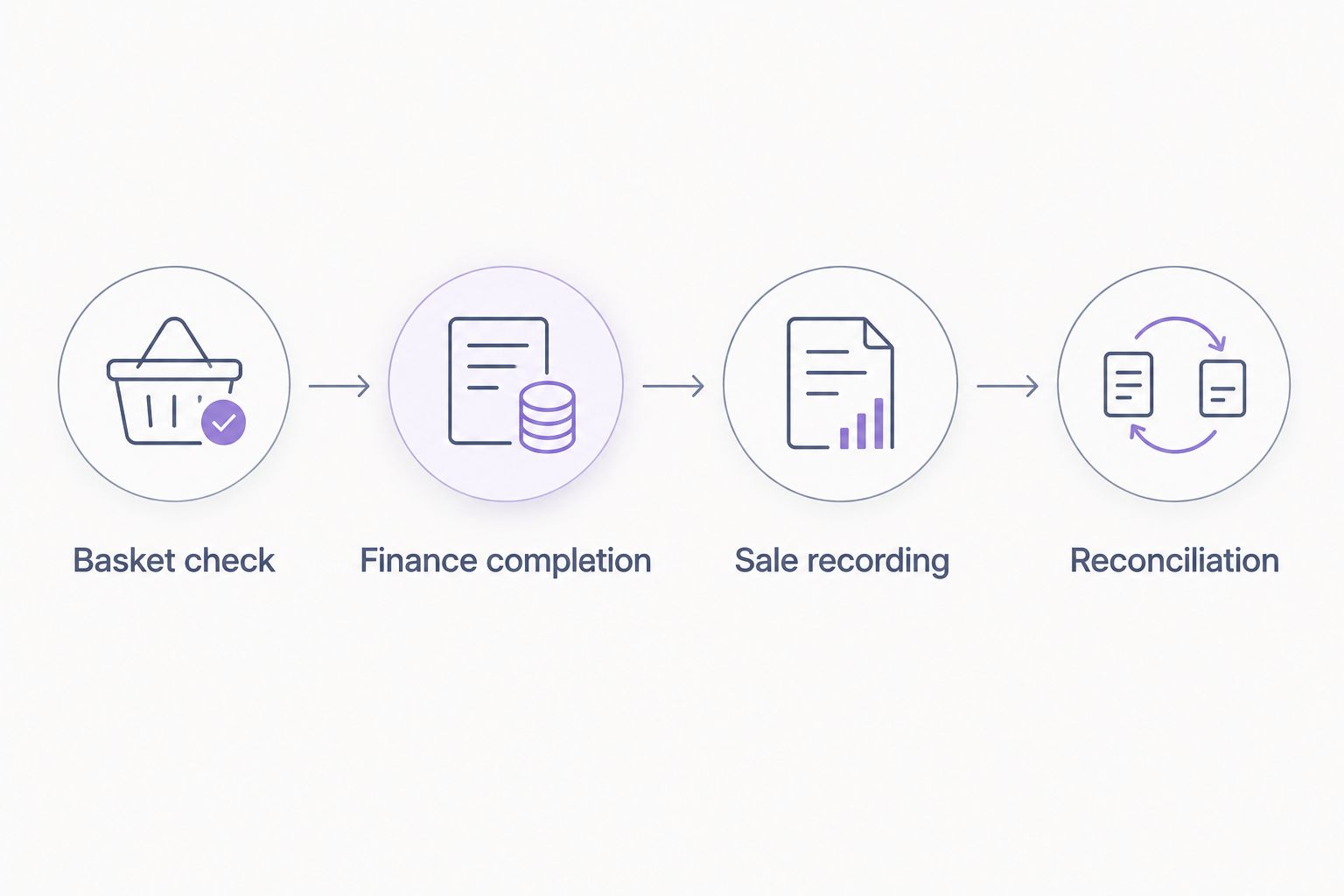
Checkout handover
Write the counter procedure
- Finalise the customer's basket before starting the finance journey. Confirm the purchase details and explain the available interest-free instalment option using the provider's approved customer wording.
- Start the finance process using the confirmed in-store method. Follow the provider's instructions for customer information, consent and any required checks; do not substitute a staff-created shortcut.
- Keep the sale at the appropriate stage in your till while the finance journey is unfinished. Use the supplier-approved procedure rather than marking it complete to clear the screen.
- Check the provider-defined transaction outcome. Follow the agreed fulfilment instruction and record the sale only when the required condition has been met.
- Store the matching references in their designated locations. Tell the customer where to find the finance information supplied through the approved process.
Expected result: A member of staff can explain what happens next, identify a completed transaction and leave a traceable sale record. A different member of staff can inspect that record without relying on a verbal handover.
PayItMonthly point of sale finance should be presented as a payment choice, not a promise of approval. Interest-free monthly instalments describe the offering; they do not establish an individual customer's eligibility or transaction outcome.
Do not promise a decision time, a particular credit-check outcome or immediate merchant settlement unless the current provider instructions explicitly support that statement. Keep those subjects separate from the practical explanation of spreading a purchase.
Add a short escalation instruction to the counter procedure. Staff should know who handles an unfinished application, an unclear outcome or a customer who chooses another payment method. They should not have to improvise while holding an open basket.
Testing and reconciliation
Check the complete transaction lifecycle
- Ask your providers how to test safely. Use a test environment or supervised procedure where supplied; do not create fictitious customer applications or submit real finance transactions simply to explore settings.
- Run 3 test cases through the authorised procedure: a completed purchase, an unfinished finance journey and a cancelled purchase. Record the expected outcome for the till and finance system in each case.
- Compare the matching references and purchase details. Check which system changes first, whether staff must take another action and what happens when the outcome is unclear.
- Test the confirmed refund or cancellation procedure. Establish how staff find the original purchase and how the two systems reflect the adjustment.
- Reconcile the test records using the reports your providers identify. Document who investigates unmatched entries and what evidence closes an exception.
Expected result: You can trace each test from the basket through to its final recorded outcome. Staff know which actions are automatic, which are manual and which require a supervisor.
For a 2026 launch, keep a dated sign-off record with the till version, approved workflow and people responsible for testing. Repeat the relevant checks after changes to the till, connection or finance procedure.
The limitation of PayItMonthly point of sale finance is that offering instalments does not remove your responsibility to record sales correctly. Your checkout process still needs transaction matching, exception handling and a confirmed refund route.
Do not treat merchant settlement as another name for sale completion. Ask the provider which report confirms settlement, then use that report for accounting checks rather than inferring payment from the till receipt.
Variant: handle a changed basket before completion
A customer can change the purchase before the checkout process finishes. Build a separate change-handling branch into your procedure rather than asking staff to adapt the original transaction informally.
- Pause the checkout when the customer changes the basket. Establish the current state of the finance journey before making another entry.
- Confirm the revised purchase details. Ask the provider's instructions whether the existing journey can be amended or must be stopped and restarted.
- Follow that authorised route and preserve the reference history. Make the relationship between the original basket and revised purchase clear in the permitted records.
- Verify that only the intended purchase reaches completion. Resolve the earlier record through the documented cancellation or amendment process.
Expected result: The final purchase and finance record agree, and the earlier attempt remains explainable.
For your 2026 change procedure, distinguish a basket adjustment before completion from a refund after completion. The transaction state determines which instruction staff follow. Do not overwrite a completed sale to make the records appear to match.
Troubleshooting
The finance journey has started, but the till sale is unfinished
Check the provider-defined outcome before taking another payment or restarting the application. Follow the agreed recovery procedure, preserving the original reference. Escalate an unclear state rather than treating it as either success or failure.
The purchase details do not match
Compare the final basket against the finance record and identify when the difference arose. Stop fulfilment until the discrepancy is resolved through the authorised amendment or cancellation process. Do not alter a completed record simply to remove the mismatch.
Staff have created duplicate attempts
Inspect the transaction references and confirm the state of each attempt. Resolve unwanted entries using the provider's instructions, then add a check-before-retry step to your counter procedure. A retry must not become a second completed purchase.
Finance sales appear in the wrong till report
Check the payment category and reporting configuration with the till supplier. Ask your accounts lead how affected transactions should be corrected while preserving the audit trail. Do not re-enter the sales as new purchases to move them between categories.
A cancellation appears in only one system
Trace the original reference and check whether the authorised process requires a separate action in the other system. Confirm the outcome on both sides before telling the customer that the adjustment is complete. Assign the exception to a named owner.
Customise your workflow
Once the core checkout works, extend the procedure to staff handovers, multiple tills and supervisory access. Keep the same matching rules wherever the customer completes the purchase.
Use the guide to handling finance refunds and order cancellations to structure the next stage of your operating instructions. Confirm the provider-specific process before applying it to live transactions.
Review your 2026 workflow after material configuration changes. The aim is not to add more instructions; it is to keep the handover between checkout, finance and accounts clear.
FAQ
How do I connect PayItMonthly to my point-of-sale till?
Start by confirming the supported connection method for your exact till with PayItMonthly and your till supplier. Then configure transaction references, sale recording and completion checks using their current instructions, and test the full workflow before launch.
Does point of sale finance require a direct till integration?
A direct till integration is not the only possible workflow design, but your providers must confirm which route your business can use. A separate staff-managed process needs an authorised handover and manual transaction matching.
Can I assume my existing till supports PayItMonthly?
No: confirm compatibility for your till supplier, software version and merchant configuration before changing checkout settings. A general buy now pay later feature does not establish support for a particular provider.
When should staff record a finance sale as complete?
Staff should record completion only after the provider-defined condition has been met and the agreed till procedure permits it. Starting an application is not proof that the purchase is complete.
What should I do if a customer changes the basket?
Pause checkout and follow the provider's authorised amendment or restart procedure. Check the current finance transaction state first and preserve the reference history so the revised purchase remains traceable.
What should I test before offering finance at the counter?
Test a completed purchase, an unfinished finance journey and a cancelled purchase through a provider-approved testing procedure. Verify matching references, final outcomes and the actions staff must take in each case.
Does completing a till sale mean merchant settlement has happened?
No: sale completion and merchant settlement are separate checkpoints. Confirm settlement using the report or notification identified by the finance provider, not the till receipt alone.
One last thing
Test a staff handover, not just a transaction. Ask someone who did not perform the checkout to locate the purchase, identify its outcome and explain the next action using only the permitted records.
If they need the original cashier's memory, the workflow is not ready. A useful till connection leaves evidence that survives a shift change.