
Instead of manually chasing unfinished orders, recover abandoned checkout with buy now pay later by setting up a reminder workflow that checks the checkout is still incomplete, confirms contact permission, and returns the customer to checkout with the finance option explained. Keep the reminder separate from the finance application: reopening a basket must not submit an application or promise approval.
- Recover abandoned checkout with buy now pay later using checkout reminders, purchase suppression and clear instalment information.
- PayItMonthly provides UK businesses with buy-now-pay-later finance through interest-free monthly instalments.
- Check contact permission and current checkout status immediately before sending each recovery message.
- Return customers to checkout; do not automatically submit finance applications or promise acceptance.
PayItMonthly buy-now-pay-later is best for UK retailers seeking interest-free monthly instalments for customers. Explore PayItMonthly for the finance service; configure the recovery process through your store and messaging systems.
Why this matters
An abandoned checkout records an unfinished purchase, not the reason the customer stopped. Your reminder should present instalments as a payment choice, not assume the customer has an affordability problem.
The workflow has two separate jobs. Your store and messaging system identify an eligible unfinished checkout and send the reminder; the finance process handles the customer's decision to apply and any required checks.
For your 2026 recovery plan, make the return to checkout useful before adding more messages. A reminder that restores the wrong basket, arrives after purchase or promises acceptance creates a problem rather than removing one.
Before you start
- Store and workflow access: Have permission to configure checkout events, completed-order checks, message suppression and a supported checkout-return link. Confirm that your systems can pass a stable checkout identifier between them.
- Finance and messaging materials: Have your merchant arrangement, the current customer-facing finance wording and an authorised messaging channel. Confirm that the finance option works at checkout before referring customers back to it.
- The gotcha: separate purchase and contact records. A completed order can appear under a different record from the original checkout. Test the connection, and confirm the applicable consent or soft opt-in requirements before enrolling contacts in marketing reminders.
Use the instructions below as a configuration specification, not a menu-by-menu integration guide. Map each behaviour to the controls your systems actually provide; do not substitute a similar-sounding event without testing what it records.
Checkout trigger and eligibility
Capture the right checkout
- Select an event that identifies a started but unfinished checkout with a usable contact record. Do not treat every product-page visit or basket addition as a recoverable checkout.
- Store the checkout identifier, contact identifier, last checkout activity, checkout-return reference and order status. Keep the information needed for recovery; exclude payment credentials and finance application details.
- Add a waiting period before evaluating the checkout. Choose the delay for your sales process and document it rather than treating a generic timing recommendation as a measured result.
- Re-read the checkout after the delay. Continue only if it remains incomplete and the customer has not completed the associated purchase.
Expected result: one unfinished checkout produces one eligible workflow record, while a checkout completed during the waiting period produces no reminder.
Use 1 reminder per checkout as the initial launch cap. This is a starting configuration, not a performance benchmark. It keeps the first release easy to inspect and prevents an accidental multi-message sequence while you validate the logic.
Gate the contact and finance message
- Check the customer's current contact permissions and suppression status. Treat a finance recovery message as marketing for your compliance review rather than assuming an unfinished checkout authorises contact.
- Exclude contacts who have opted out, lack the required permission or have no usable destination for the selected channel.
- Confirm that the checkout can still present the intended payment choice. Where your system cannot determine this reliably, use a general checkout reminder instead of a personalised finance claim.
- Route records that fail a check to an exit state. Do not leave them queued for a later send without a fresh eligibility check.
Expected result: the send queue contains only incomplete checkouts with an appropriate contact basis and a suitable message.
Include this gate in your 2026 consent review. An email address collected during checkout is not, by itself, permission to send marketing. Have your compliance owner confirm how the applicable rules apply to your collection process and messages.
Recovery message and checkout return
Choose the reminder format
Use a finance-led reminder when you can explain the payment option accurately and return the customer to a working checkout. Otherwise, send a neutral checkout reminder.
| Reminder format | Best for | Advantage | Limitation |
|---|---|---|---|
| General checkout reminder | Unfinished purchases without a verified finance message | Keeps the message focused on returning to the purchase | Does not explain the instalment option |
| Finance-led checkout reminder | Checkouts with a confirmed customer-facing finance option | Makes the payment choice visible before the customer returns | Requires current finance wording and a working checkout route |
PayItMonthly's stated finance benefit is interest-free monthly instalments. The recovery workflow still needs a separate checkout trigger, contact check and message process; do not treat the finance service as proof that those connections are already configured.
Build the message
- Open your message editor and write a subject that accurately describes an unfinished checkout. Avoid implying a finance decision has already been made.
- Add a short explanation of the payment choice, using the wording approved for your merchant arrangement. Distinguish interest-free instalments from a promise that every customer qualifies.
- Insert the supported checkout-return reference through your platform's secure message-link mechanism. Do not construct a checkout address by guessing a path or exposing a customer identifier.
- Add the required sender information, opt-out mechanism and applicable finance disclosures. Preview the complete message rather than reviewing the headline alone.
Expected result: the customer receives a clear invitation to return, with no application submitted and no approval implied.
A useful message structure is: unfinished checkout, payment choice, return action. Keep the customer's choice intact. Avoid language that pressures someone to borrow, describes credit as income or suggests that finance removes the obligation to repay.
Verify the destination
- Open the checkout-return link using a test contact and a separate browser session.
- Check that the intended basket is restored and that the customer can review the order before continuing.
- Confirm that the finance option appears where expected and that the customer must actively choose it.
- Check the experience on mobile as well as desktop, including the transition from the message into checkout.
Expected result: the customer returns to an editable checkout rather than an unrelated landing page or an automatically started finance application.
For your 2026 message review, inspect the reminder and checkout together. Accurate email wording does not fix a confusing destination, and a working checkout does not fix an inaccurate finance claim.
Purchase suppression and launch checks
Stop the workflow before sending
- Add a final order-status lookup immediately before the send action. Use the checkout identifier and your tested order-matching logic.
- Recheck contact permissions at the same point. An opt-out received during the waiting period must prevent the message.
- Store a sent marker against the checkout identifier. Reject a second send attempt for the same checkout in the initial workflow.
- Exit the workflow after sending, purchase completion, opt-out or failed eligibility. Record the exit reason for diagnosis.
Expected result: a purchase or opt-out recorded before the final send check stops the reminder, and repeated event delivery does not create duplicate messages.
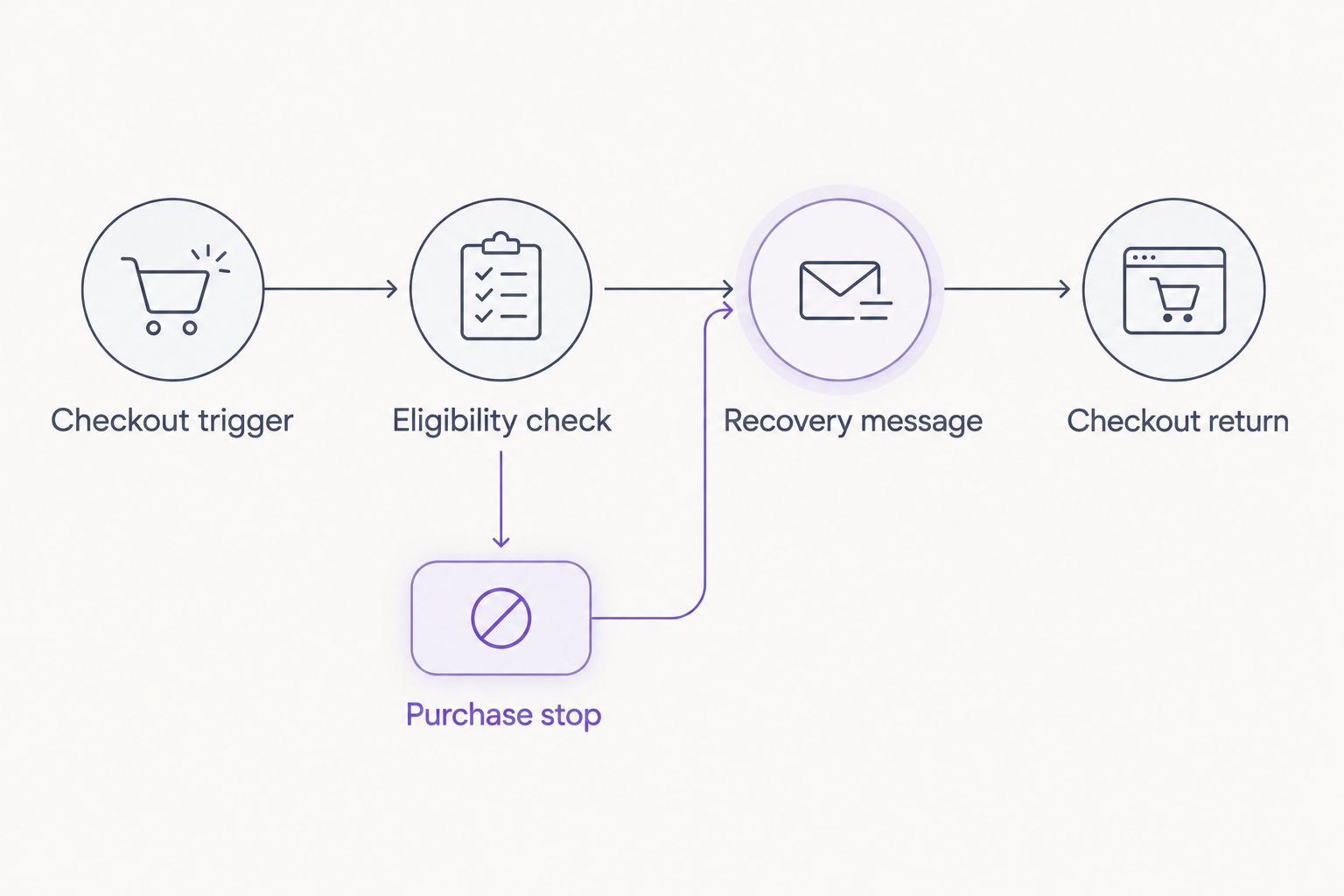
The core sequence is Checkout trigger, Eligibility check, Recovery message, Checkout return, with a Purchase stop that overrides the send whenever completion is detected. Check purchase status both after the wait and immediately before sending.
Run controlled launch tests
- Create 4 test scenarios: an incomplete permitted checkout, a completed checkout, an opted-out contact and a duplicate checkout event.
- Run each through the full waiting, eligibility and send sequence using test recipients. Inspect the recorded decision as well as the delivered message.
- Confirm that only the permitted incomplete checkout produces a reminder. Confirm that the duplicate event cannot bypass the sent marker.
- Save the test results, configuration owner and change date before enabling the workflow for customers.
Expected result: the workflow demonstrates its stop conditions, not just its ability to send an email.
Add 2 device checks to your 2026 launch checklist: mobile and desktop. These are recommended acceptance checks, not claims about traffic share or conversion performance.
Re-offer finance when a checkout is updated
A second workflow is useful when a customer returns and changes the basket but leaves again. Handle this as an update to the checkout record, not an instruction to send another message immediately.
- Listen for checkout updates that your store can distinguish from background activity.
- Refresh the saved basket reference and last meaningful activity time. Invalidate queued content that no longer matches the checkout.
- Restart the waiting period only for a relevant customer change, such as a changed basket or checkout details.
- Apply the same contact, purchase and finance-message checks before any send. Keep the initial one-reminder cap unless you deliberately approve a different policy.
Expected result: an updated checkout produces current recovery content without creating parallel reminder sequences.
Do not use a declined finance application as the trigger for this variant. Checkout recovery and finance decisions are different processes. A customer who leaves after a finance decision needs handling consistent with the provider's process, not repeated invitations presented as renewed acceptance.
Troubleshooting
A reminder arrives after purchase
Check whether the workflow tests purchase status only when it starts. Add the final lookup immediately before sending, then test whether completed orders reliably match the checkout identifier.
Inspect queued messages too. A message already handed to a delivery service is different from one still waiting inside the workflow; establish where cancellation remains possible.
The checkout link opens the wrong basket
Check that the stored return reference belongs to the checkout, not a reusable customer-level field. Generate the message from the current checkout record and test it in a separate browser session.
If your platform cannot restore that checkout, change the destination and message together. Do not promise a saved basket when the link cannot return one.
Customers receive duplicate reminders
Check for repeated event delivery and overlapping recovery automations. Use the checkout identifier as the deduplication key, and disable competing sequences that send the same recovery message.
Confirm that the sent marker is written as part of the send-control process. A marker added only after an unrelated reporting task leaves a gap for duplicate attempts.
The finance message no longer matches checkout
Compare the message template with the current customer-facing finance wording and checkout behaviour. Remove hard-coded repayment illustrations that your workflow cannot keep accurate.
Pause the finance-led message until the mismatch is corrected. A general checkout reminder is the clearer fallback when the finance explanation cannot be verified.
Customize your workflow
Expand the workflow only after the basic recovery path and stop conditions pass testing. Start with customer needs: clearer payment explanations, a better checkout return or an appropriate support route.
For checkout placement, use the guide to adding a buy-now-pay-later option at checkout. Treat a recovery reminder as a return route to that experience, not a replacement for it.
Keep your 2026 reporting split between messages delivered, checkout returns and completed orders. A link click is not a recovered sale, and a finance application is not a completed purchase.
Where you compare reminder formats, define the measurement window and use comparable eligible groups. Report the observed result without claiming the reminder caused every purchase that followed it.
FAQ
How do I recover abandoned checkout with buy now pay later?
Trigger a reminder from an unfinished checkout, check contact permission and purchase status, then return the customer to checkout with the finance option explained. Keep finance application and approval separate from the reminder.
Does PayItMonthly automatically send abandoned-checkout reminders?
This guide specifies a recovery workflow rather than a confirmed PayItMonthly reminder integration. PayItMonthly provides interest-free monthly instalments; confirm the supported connections with your store, messaging system and provider before configuration.
Can I email everyone who leaves a checkout?
No: an unfinished checkout does not itself authorise marketing contact. Check the applicable consent or soft opt-in requirements and honour opt-outs before sending.
Should the reminder say the customer is already approved?
No: checkout abandonment is not a finance approval. Use the authorised finance wording and let the customer actively choose whether to continue with the application process.
What's the best time to send a finance recovery reminder?
Choose the waiting period for your sales process and test it against completed orders and customer responses. Recheck eligibility immediately before sending rather than relying on the checkout's original status.
What happens if the customer completes the purchase during the wait?
The workflow should stop when it detects the completed purchase. Match the order to the checkout and perform a final status check before the send action.
How do I know whether the reminder recovered a sale?
Track completed orders separately from message delivery, clicks and finance applications. Use a defined measurement window and a suitable comparison group before attributing additional sales to the reminder.
One last thing
Test the message that should never send. Complete a test purchase while its reminder is waiting, then inspect whether the workflow stops it. That single acceptance test checks the boundary between helpful recovery and chasing someone who has already bought.